A cross-platform MMORPG: one character on phone and PC
Cross-platform can mean a lot of things. In Averse Lands it means one account and the same characters on any computer with a browser, and on a phone through a test mode. Here is exactly how far that goes today.
One account, the same characters everywhere
Averse Lands is a free 3D MMORPG that runs in a browser tab, and everything about your characters is kept on our server: level, skills, bag, warehouse, quests and where you stood. An account holds up to three characters. Sign in on another device and you carry on exactly where you left off, in the same world as everyone else. There is one world, not separate servers for each kind of device.
Your account is in the world from one place at a time. If you enter on a second device, the first one is told that your account entered the world elsewhere.
Computers: the full game
Any Windows PC, Mac or Chromebook with a current browser plays the whole game with a mouse and keyboard: Chrome, Edge, Firefox, or Safari on macOS 13 or later. The Mac guide and the Chromebook guide cover the details for each.
Phones: a test, not finished support
The game is made for a computer, and a phone that opens it is told so. To let players try it anyway, there is a phone test: open averselands.com/play/?phone=1 on your phone and turn it sideways. The tab remembers it until you close it.
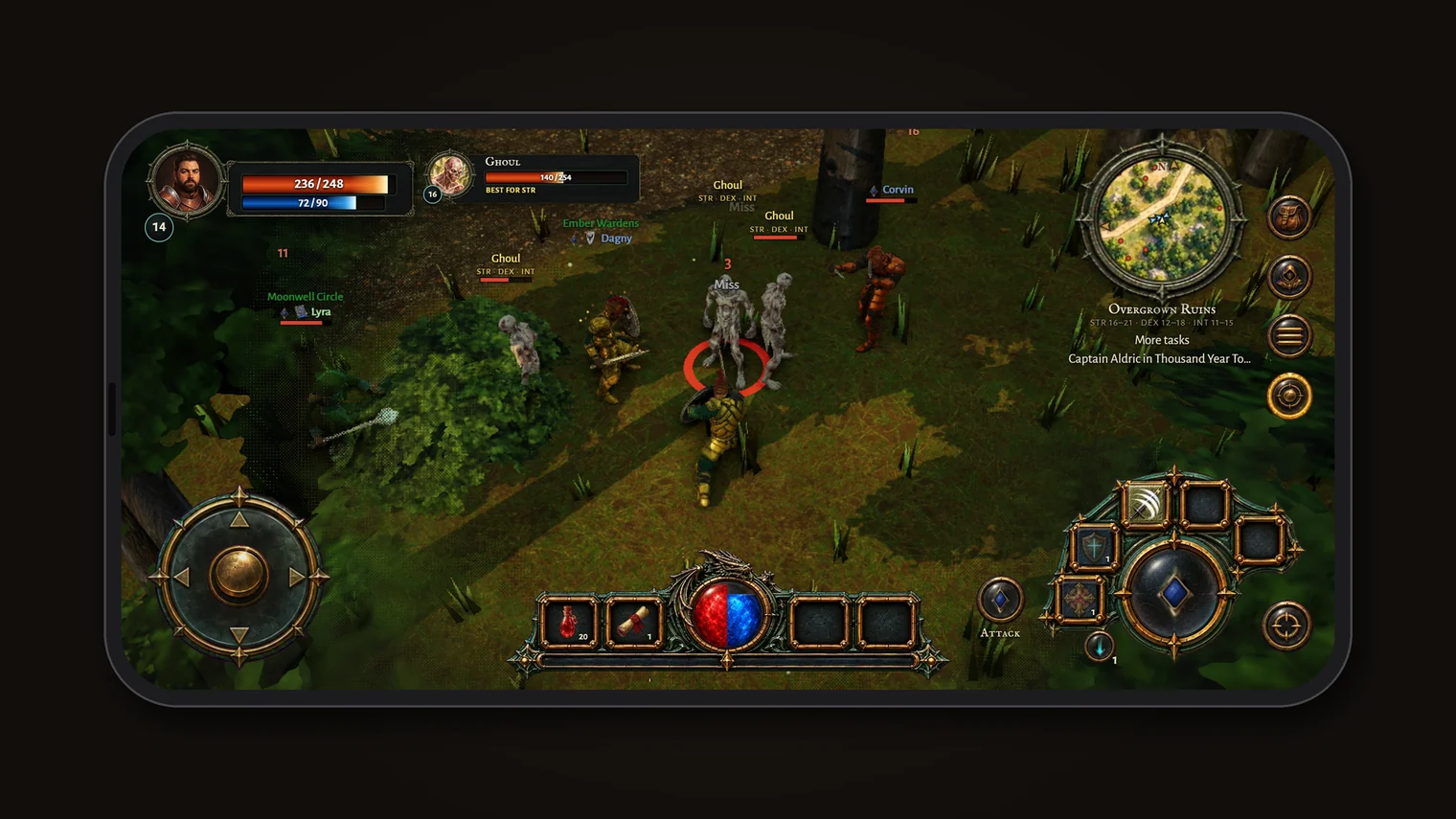
What the phone test has today:
- Its own controls: a thumbstick to walk, an attack gem with your skills round it, a stance button, and round buttons for your bag, your character and the menu. Two fingers pinch to zoom, and a long press on a monster or a player does what a right-click does on a computer.
- Lessons for thumbs. The first lessons on The Landing teach the phone's controls instead of the mouse and keys.
- A lighter graphics setting, with no sun shadows and fewer pixels, and only the ten nearest players drawn in full armour, to save the phone's memory.
And its limits, honestly:
- It is tested on very few real phones. Much of the tuning was done on a computer imitating a phone.
- A phone can close the tab if the browser runs short of memory, especially in a busy town.
- No app yet. It runs in the phone's browser, whose address bar takes some of the screen; Safari's page menu can hide its toolbar.
- A tablet without a mouse counts as a phone and needs the same link. With a mouse or trackpad attached, it plays as a computer.
How it compares
Albion Online and Old School RuneScape are the best-known MMORPGs that share one world between computers and phones, through apps you install on each. They are the place to go if you want polished phone play today. Averse Lands is earlier on that road: the full game on every computer through the browser, and the phone in testing. If that suits you, the OSRS comparison and the open PvP guide explain what kind of game it is.
Averse Lands is in a small, free beta. Apply with Discord and we read every application ourselves.
Apply for the beta